Flash sales with a countdown
A flash sale sells a few items cheaper for a short window: a three-day clearance or a weekend deal. You don't change prices by hand at midnight: define the campaign once, and the discount goes on at its start and comes off at its end.
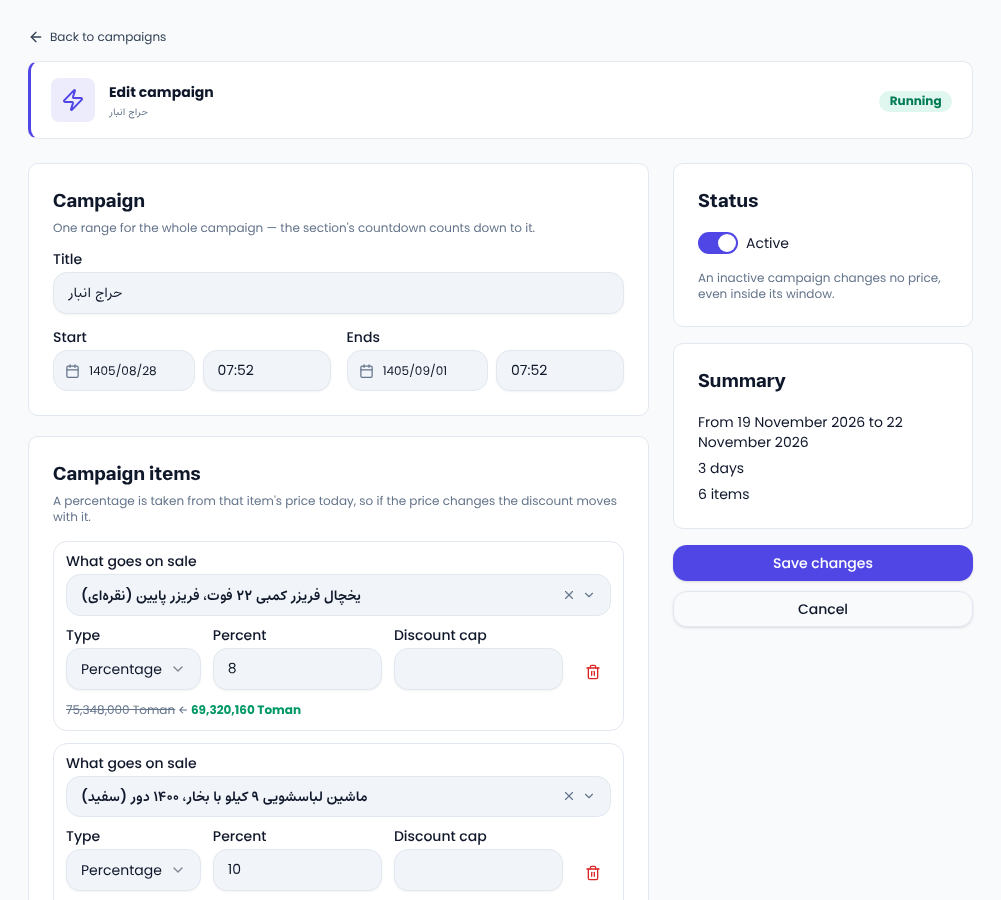
Create a flash sale
- In the site admin open «Marketing → Amazing offers» and press new campaign.
- Give it a title and pick the start and end date and time.
- Under «Campaign items» find each item by title, choose a percentage or a fixed sum and its value; a percentage can have a «Discount cap».
- Add more items and save.
Each item shows today's price and the sale price before you save.
What can be on sale?
Shop products (each variant), and where your site has them, audiobooks, ebooks, courses and audio files. An item can be in one active campaign at a time; overlapping windows are refused, naming the other campaign. One may start the moment another ends.
How prices work
- The list price is never changed; the discount follows today's price.
- A campaign never raises a price: an item already cheaper keeps its lower price.
- Discount codes apply on top of the sale price.
- The order is priced on the server when it is placed, so a basket filled during the sale and paid after it pays the normal price.
Pause, edit, delete
Switching «Active» off pauses the campaign and restores prices at once, keeping its items. Deleting it restores prices at once too.
Show it with a countdown
Add the flash-sale block in the page builder. It shows the running campaign's items with a countdown to its end, and hides itself when nothing is running.
For timing ideas, see Shopify's flash sale guide.
Comments
Sign in to leave a comment.
Sign inLoading…