Creating discount codes for your online store
Discount codes are words a shopper types in the basket to take money off the price. With them you can run a seasonal campaign, win a first order or thank a loyal customer. Creating discount codes in Sima is one form.
Making a discount code
In your site's panel, open Marketing → Discount codes, press New code and fill in the form.
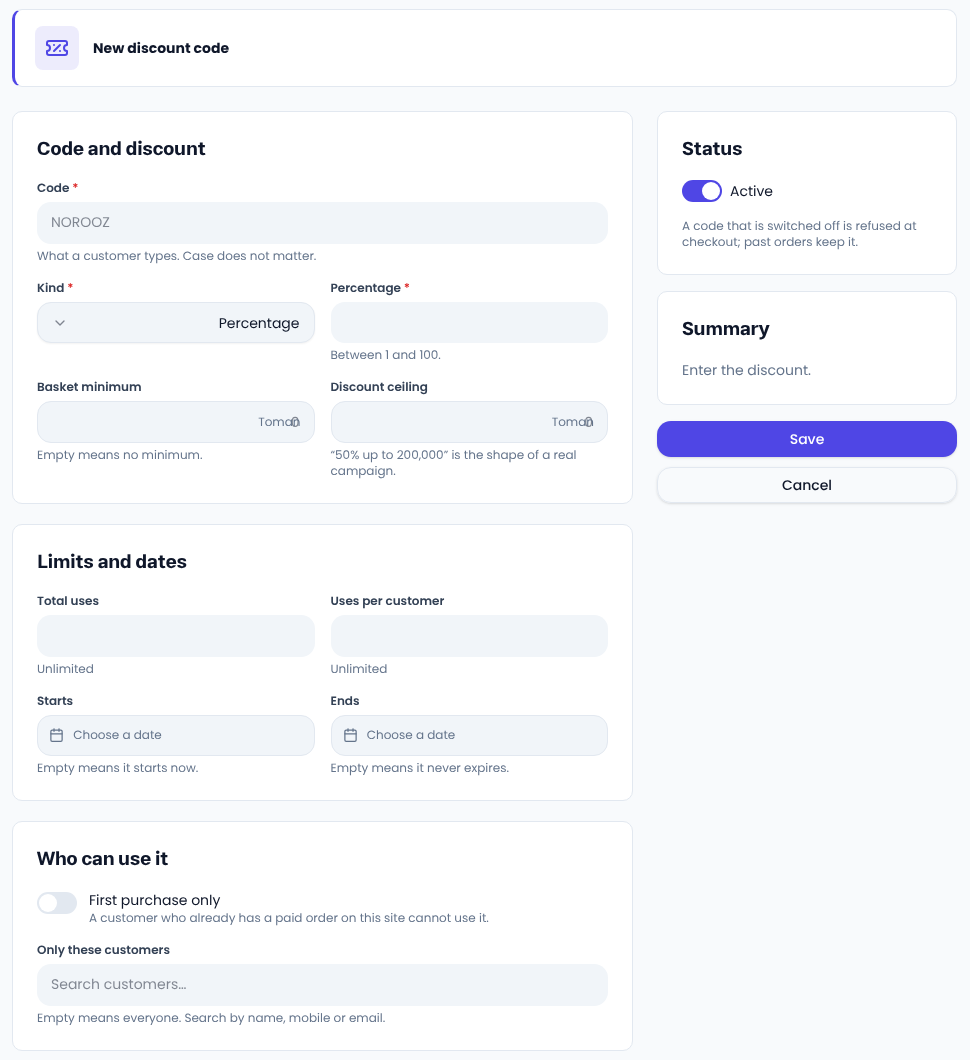
- Code is what the customer types, such as SPRING; case does not matter.
- Kind is a percentage or a fixed amount. A percentage must be between 1 and 100.
- Basket minimum means the code only works on a basket of at least this amount.
- Discount ceiling caps a percentage code; “50% up to a fixed amount” keeps a campaign realistic.
Limits and dates
Total uses is how many times the code can be used in all, and Uses per customer is each customer's share; empty means unlimited. Pick the Starts and Ends dates; an empty start means now and an empty end means it never expires.
Who can use it
With First purchase only, a customer who already has a paid order on your site cannot use the code. Under Only these customers you can pick customers by name, mobile or email; empty means everyone.
Press Save. When the campaign is over, switch Active off; a switched-off code is refused at checkout and past orders keep it.
Common questions
Can I discount without a code? Yes: for a discount on the item itself, enter the Price before the discount on the product page, and for a timed sale see Amazing offers under Marketing.
Which code sold the most? The usage column and the Stats button show it.
For campaign ideas, see Shopify's guide to discount pricing.
Comments
Sign in to leave a comment.
Sign inLoading…