Abandoned carts: see them and remind shoppers
20 Nov 20262 min read4 views
Many shoppers fill a cart and leave without paying; Baymard puts it near 70%. Each abandoned cart is a customer who got close, and one reminder can bring them back.
Where are they?
In the site admin open «Sales → Abandoned carts». Every cart that holds something and has sat untouched past the window (24 hours by default) is listed with its shopper, items, today's total, last touch and start.
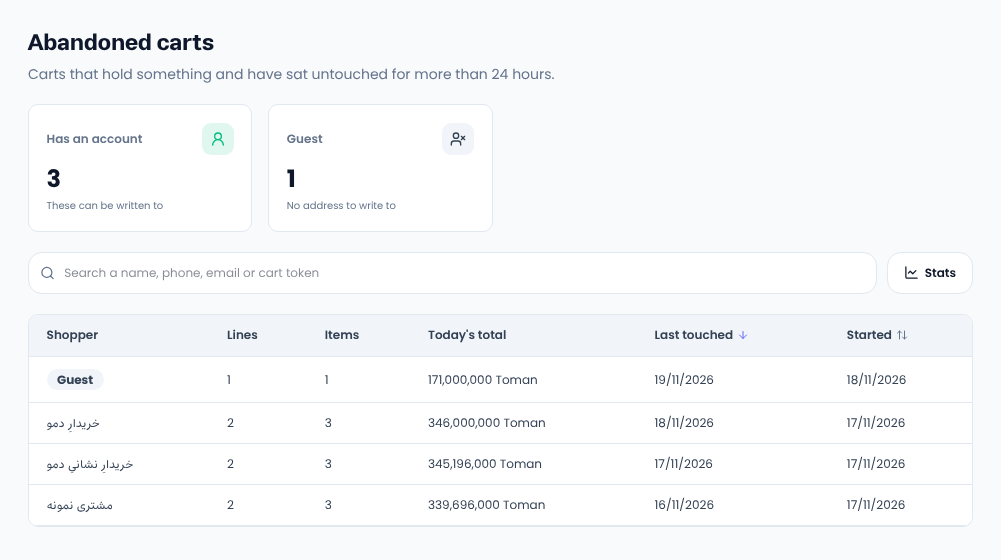
- Has an account: these can be written to.
- Guest: no address to write to, so no message.
A cart that becomes an order leaves the list on its own.
The abandonment window
Change «Cart abandonment window (hours)» in the shop settings, from 1 to 720. The list follows at once.
Send a reminder
- In «Marketing → Bulk send» start a new send.
- Pick «Owners of abandoned carts» as the audience; the preview counts account holders only, so it can be lower than the list.
- Write and send. Anyone who orders before delivery is skipped.
Messages go out through the channels your site has set up (SMS, email and messengers).
Ideas
- Keep it short and link the cart.
- Add a timed discount code if your margin allows.
- One reminder is usually enough.
Comments
Sign in to leave a comment.
Sign inLoading…