A bilingual website: adding a language and translating
A bilingual website reaches customers abroad and visitors too. In Sima every page, post and product has its own address in each language, and Google knows each language apart.
Turning on a second language
Open Settings → General settings → Site identity, go to Languages and turn the second language on under Site languages. Only the languages your plan includes are listed.
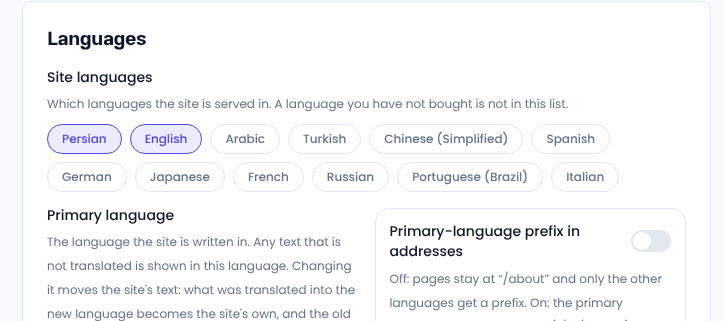
- The Primary language is the one the site is written in. Anything not translated is shown in it.
- Primary-language pages have no prefix (such as /about) and the second language does (such as /en/about).
Translating content
You translate in the same form, not a separate one. At the top of a post, page or product form, switch the language, write the text in the second language and save. Price, pictures and stock are shared between languages; only the words are translated.
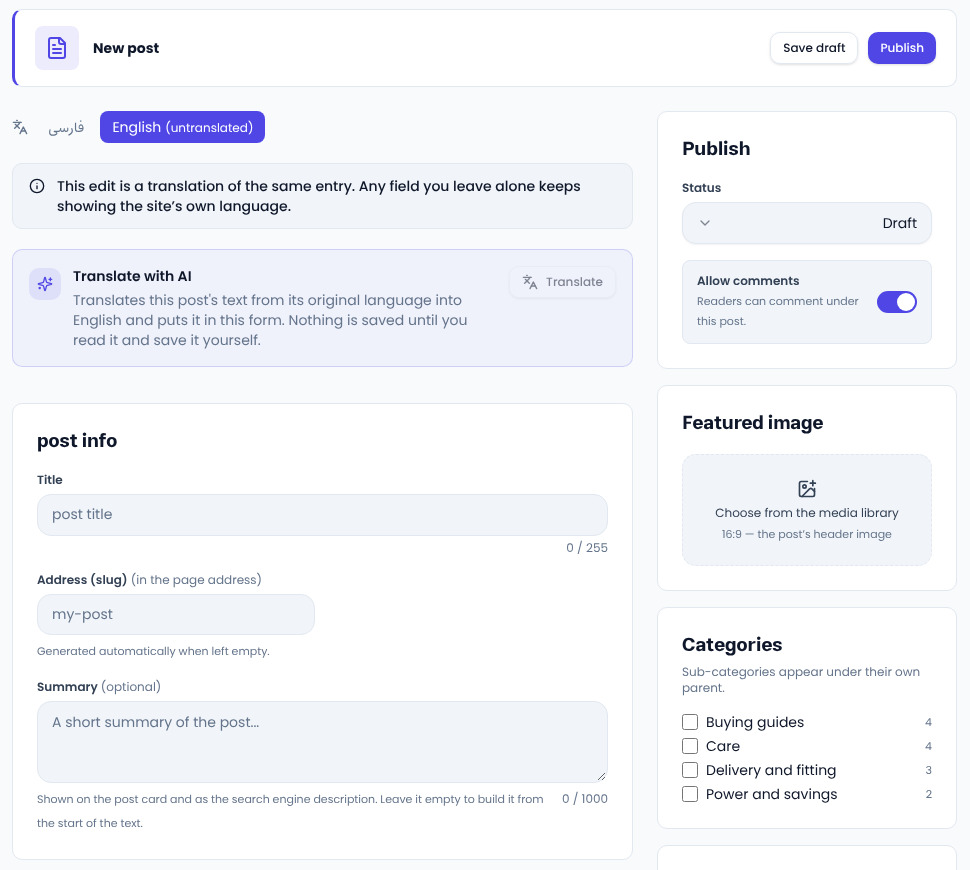
Translate with AI translates the text from the original language into the form. Nothing is saved until you read it and save it yourself. Always read it once; you know your names and terms better than any machine.
Pages built with the page builder
In the builder, switch the panel language as well and write the blocks' text in the second language. The layout stays the same and each language keeps its own words.
Common questions
What if I leave something untranslated? That page shows in the second language with the primary language's text.
If I turn a language off, what happens to its addresses? Visitors are moved to the English version or the primary language, so no page is left broken.
For Google to tell your languages apart, see Google's guide to localized versions.
Comments
Sign in to leave a comment.
Sign inLoading…