Delivery methods and shipping costs in your online store
A delivery method is how an order reaches the buyer and what they pay for it. A shop can have several delivery methods, for example express post for small items, freight for bulky ones and collection from your warehouse. The shopper picks one at checkout.
The list of delivery methods
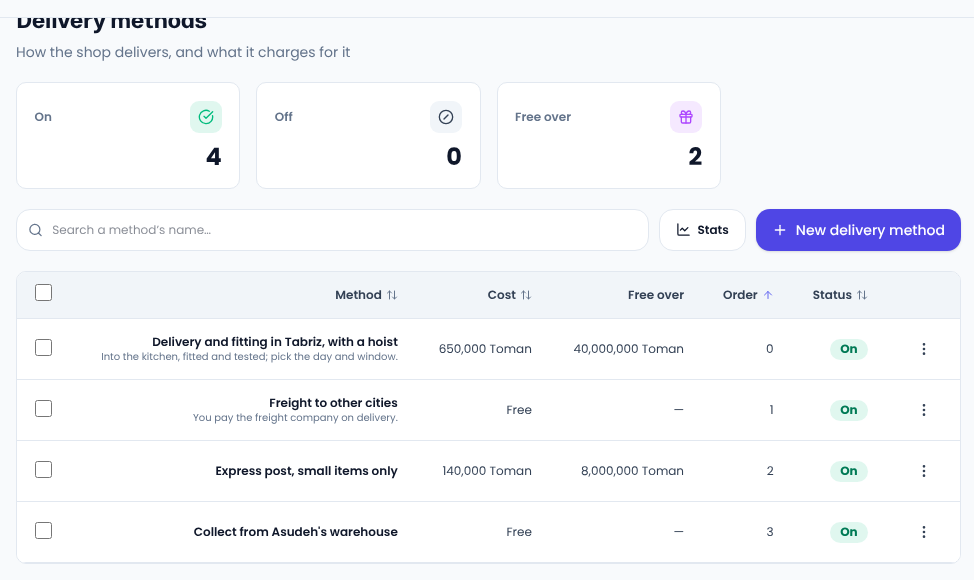
In your site's panel, open Settings → Delivery methods. Each method is listed with its cost, the basket total above which it is free, its order and its status.
Adding a delivery method
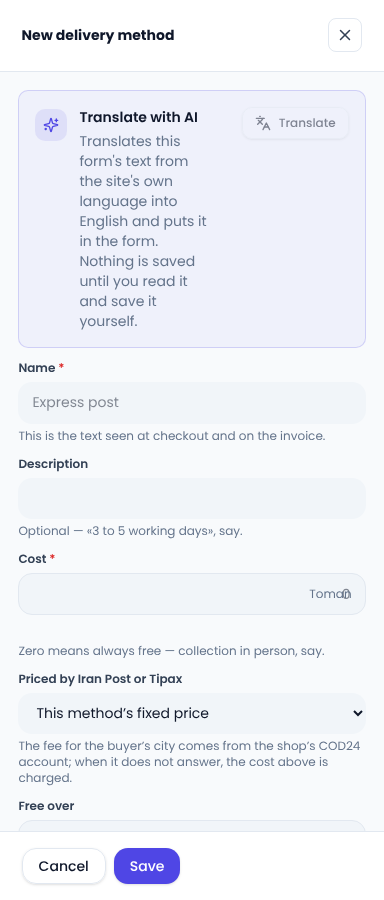
Press New delivery method and a form opens at the side:
- Title is what the shopper sees at checkout and on the invoice.
- Description is optional, for example “3 to 5 working days”.
- Cost is the fixed price of this method; zero means always free.
- Free over makes delivery free once the basket reaches this amount; empty means never.
- Order places the method in the shopper's list; smaller numbers come first.
Collection and pay-on-delivery freight
A collection method is for buyers who pick the order up themselves, so no address is asked at checkout. For freight the buyer pays on delivery, the basket and the order say so instead of “Free”, so nobody is surprised.
Bulky items
If a product is marked Bulky item on its own page, only methods that carry bulky goods are offered for it. A fridge is not offered post, only freight.
Common questions
Can I switch a method off for a while? Yes: turn its status off and it disappears from checkout until you turn it back on.
Does free delivery apply to every method? No, each method has its own free-over amount.
For what shoppers expect from delivery options, the Baymard Institute's checkout research is worth a read.
Comments
Sign in to leave a comment.
Sign inLoading…