Website SEO on Sima: keyword, title and description for every page
Website SEO means that when someone searches Google for what you do, they see your page and click it. Sima does much of the work by itself: the sitemap, robots.txt, structured data for posts and products and each page's share card are all built with no setup. Your part is writing each page well, and the panel helps right where you write. If SEO is new to you, Google's SEO starter guide is a good start.
1. The SEO section on every page
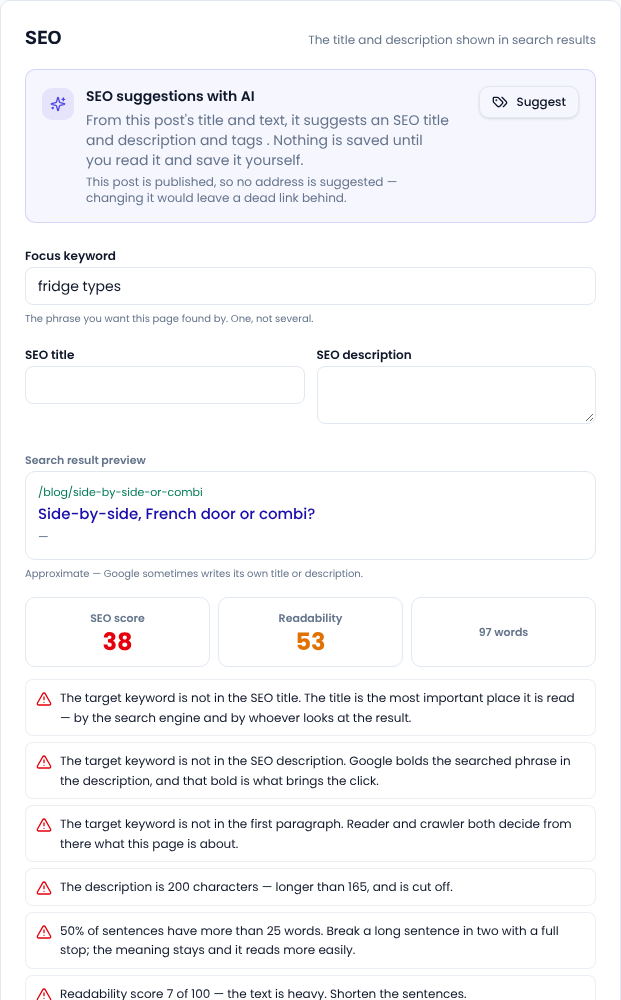
Open a post, page or product and go to the SEO section at the bottom of the form. You write three things here:
- Focus keyword: the phrase you want this page found by. One, not several.
- SEO title: the blue title of the Google result. If left empty, it is built from the page title.
- SEO description: the two lines under the title in the Google result. If left empty, it is built from the excerpt or the start of the text.
Below them, Search result preview shows roughly how the page will look on Google.
2. The SEO score and the list of issues
Under the preview are three figures: the SEO score, the readability score and the word count. They update as you type. Below them is the list of checks:
- Red: an important issue, such as the keyword missing from the SEO title or the first paragraph, or a text under 300 words.
- Orange: better fixed, such as no image or no link to an outside source.
- Green: fine.
- Empty circle: a check that could not run yet, for example because the text is still short.
Each check says in a sentence why it matters. Not everything has to be green: fix the red ones, and put the keyword naturally in the title, the description, the first paragraph and one subheading. Persian is counted correctly too: the zero-width non-joiner sits inside a word, and the Arabic and Persian forms of a letter are one letter.
3. AI SEO suggestions
At the top of the SEO section is a Suggest button. From this page's title and text, it suggests an SEO title, a description and tags. Nothing is saved on its own: read the suggestion, change it if you like, then save. A published page gets no new address suggestion, because changing it would break links already given to it.
4. Canonical URL and hiding from search
At the bottom of the SEO section are two options you rarely need. Canonical URL is only for text that is also published somewhere else, when you want Google to treat that address as the original. Keep out of search engine results marks the page noindex and takes it out of the sitemap too; it suits pages such as a thank-you page.
5. Overview and bulk editor
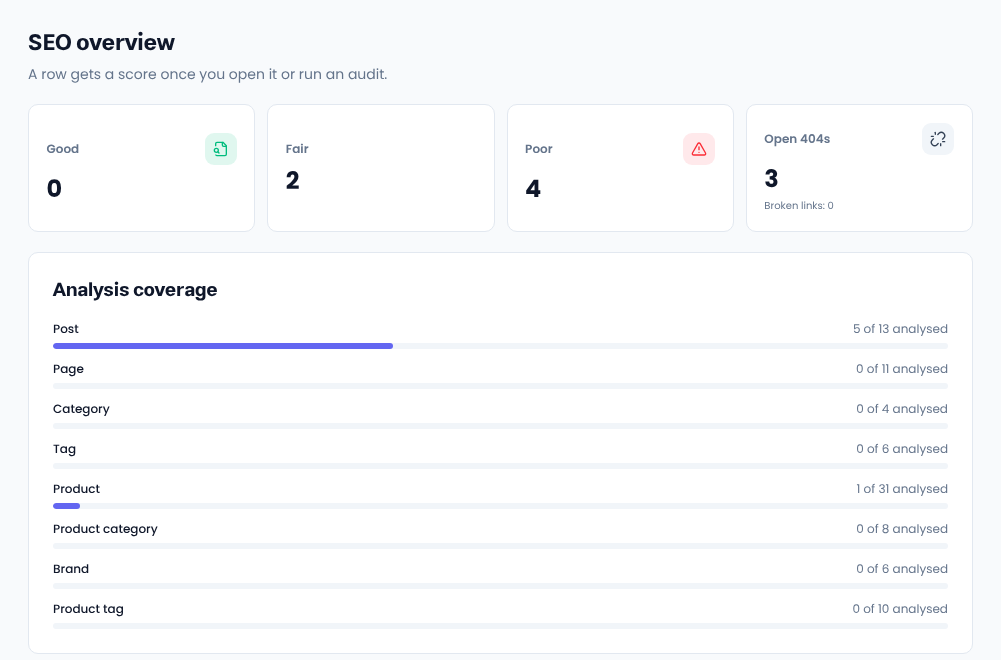
SEO → Overview shows the whole site: how many pages score good, average or weak, how many 404 addresses are open, how much of each kind (posts, pages, products, categories…) has been analysed, and which pages are weakest.
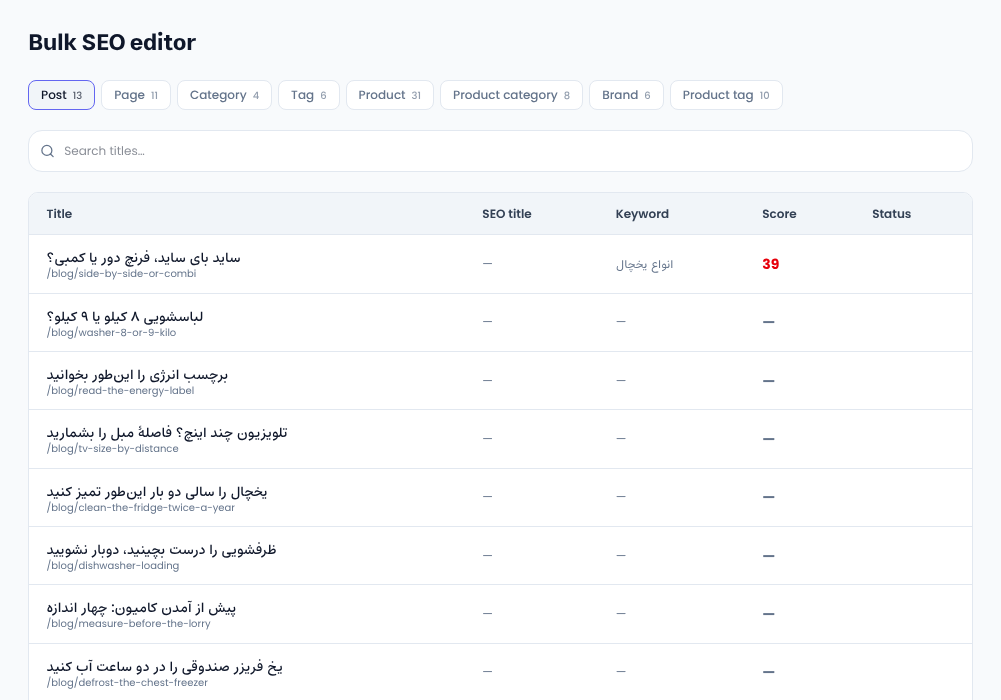
SEO → Bulk editor lists every page with its SEO title, keyword and score in one table, one tab per kind. Click a row and its full SEO opens in a drawer, so you fix it without going to the edit page. That way categories and tags, which are usually forgotten, get their own title and description too.
6. Site audit
Some problems only show when you look at the whole site: two pages with the same title competing with each other, or a page that no other page links to. Under SEO → Site audit, press Run audit to check the whole site. Each audit is kept, so you can see how many issues were fixed since last time.
7. SEO settings
Under SEO → SEO settings you set what applies to every page:
- Basics: the default title and description, the default sharing image, and the switch that keeps search engines away from a site that is not ready yet. Remember to switch it off once it is ready.
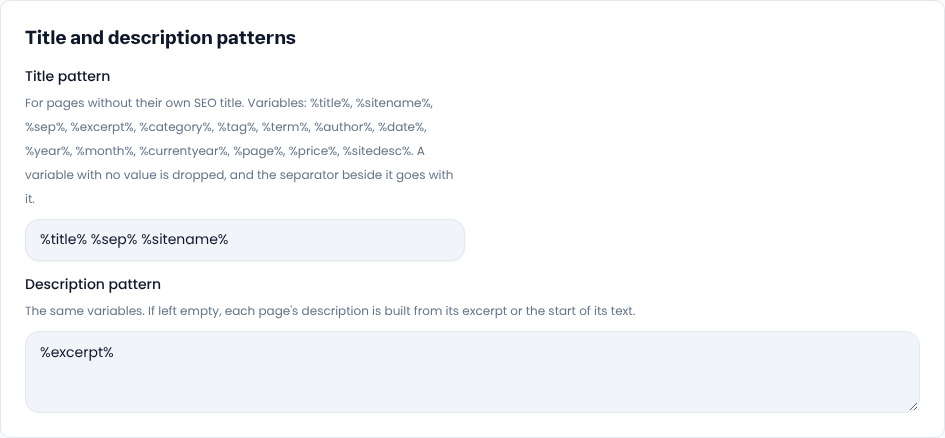
- Title and description patterns: for pages without their own SEO title, such as
%title% %sep% %sitename%. - Site owner: an organisation or a person, the official name, logo, phone and social pages, so Google recognises your brand.
- Local business: if you have a shop, clinic or office, its address and opening hours are added to the structured data.
- Sitemap: kinds you want left out of the sitemap, such as tags.
Google's ownership verification code is here as well; the guide «Connect your site to Google Search Console» walks through it step by step.
Common questions
Why do I not see the SEO section on the edit page?
The full SEO section is for people allowed to manage SEO. Everyone else sees two plain boxes for the title and the description. Tick the SEO permission for that person's group under People → User groups.
Do I have to build the sitemap myself?
No. /sitemap.xml is always there and every published page joins it on its own. You can only leave a kind out of it.
Some pages show a dash for their score. What does that mean?
They have not been analysed yet. Opening a page scores it at once, and the site works through the rest by itself over time.
Comments
Sign in to leave a comment.
Sign inLoading…