Refunds to the buyer's wallet
20 Nov 20262 min read4 views
Sometimes an item comes back, or part of an order cannot be sent, and the buyer's money has to go back. In Sima a refund is a row on the order: the order's status does not change, and the amount returned is recorded beside it.
Making a refund
Open the order (see “Managing your shop's orders”) and press Refund at the top.
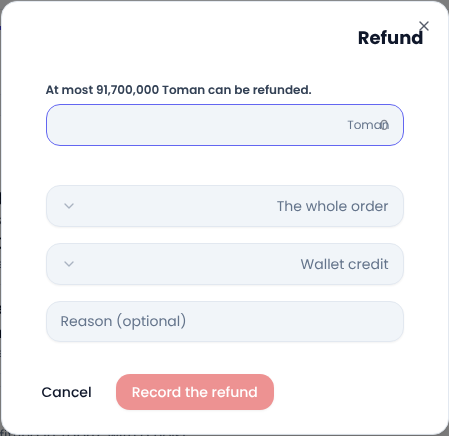
- Enter the amount. The most that can still be refunded is shown above the field.
- Choose whether the refund is for the whole order or one line. A line's refund cannot exceed that line's share of what was paid, net of its share of any discount. When a digital product such as an audiobook is refunded in full, the buyer's access to it is removed too.
- Choose where the money goes (explained below).
- Add a reason if you like and press the confirm button. You are asked once more before any money moves.
Wallet credit or back through the gateway?
- Wallet credit: the amount is added to the buyer's wallet on your site at once, and they can spend it on another order. It is the fastest way and has no bank fee.
- Through the gateway: if you already sent the money back to the buyer's card from your payment gateway's own panel, this option only records it on the order; no money moves on the site.
Good to know
- An order's refunds can never add up to more than its total.
- An unpaid or cancelled order cannot be refunded.
- The buyer is told about each refund, with the amount and where it went.
- Every refund is noted in the order's history, so you can see later who refunded what, and when.
Common questions
What happens to the order's status after a refund? It stays as it was; a delivered order with part of its money returned is still delivered.
Can the buyer move wallet money to their card? That depends on your site's wallet settings; by default they spend it on purchases.
For writing a clear returns policy, see Google Merchant Center's return policy guide.
Comments
Sign in to leave a comment.
Sign inLoading…