Publish your site's posts to your Telegram, Bale and Eitaa channels automatically
If you run a Telegram, Bale or Eitaa channel, you do not have to post every article there by hand. With Channel publishing, every new post goes to the channel on its own, with its featured image, summary and link. The whole post is not copied, so readers come to your site to read it.
1. Connect a channel
First make a bot in the messenger (on Telegram, with BotFather) and make it an administrator of your channel. Then, under Settings → General settings → Channel publishing, enter the bot token and the channel's username (such as @mychannel) or its numeric ID, and save.
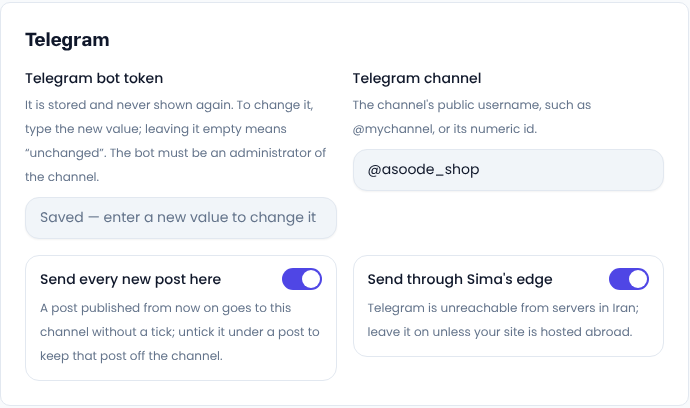
Once saved, the token is never shown again. To change it, type the new value; leaving it empty means unchanged.
Send through Sima's edge is for Telegram: Telegram cannot be reached from servers in Iran, so leave it on unless your site is hosted abroad.
2. Every new post, automatically
Send every new post here is on by default for each channel. It means every post you publish from now on is in the channel within a minute, without you doing anything. Older posts and pages are never sent on their own, only when you tick them.
3. A separate text for each channel
At the bottom of every post's edit page is the Publish to channels section. Each channel you connected appears there with a suggested text: the title, the summary and the post's address. You can change each channel's text on its own (up to 4,000 characters) and click Save channels.
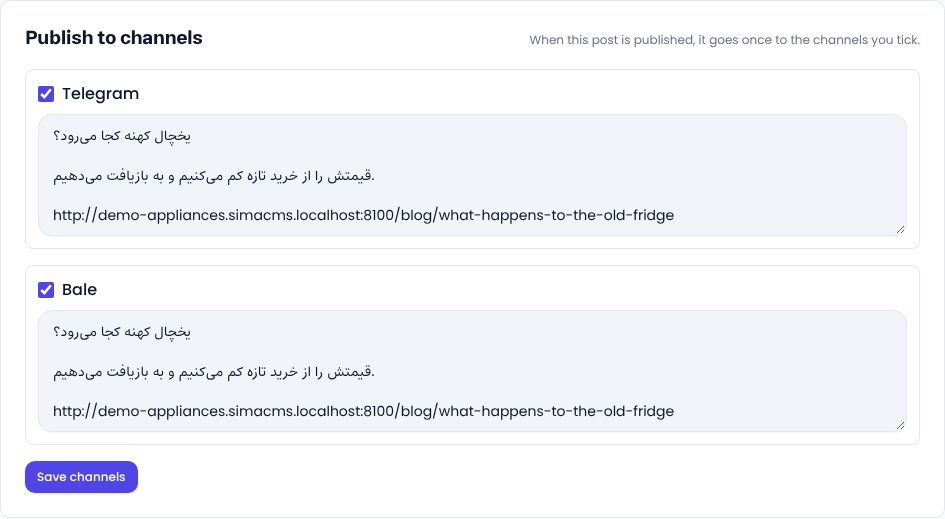
If a post should not go to one of the channels, untick that channel and save before you publish. For a scheduled post, the message goes out the moment it is published.
4. Only once
Each post goes to each channel once. If you edit the post later, nothing more is sent, and the channel shows when it was sent. The featured image goes as a photo with the text as its caption when the text fits, otherwise the text goes alone.
5. When a send fails
If the messenger cannot be reached or refuses the message, Sima tries again after 1, 5, 15 and 60 minutes and shows the reason under that channel. After five tries it is marked failed. Fix the cause (usually the bot is not an administrator of the channel, or the channel name is wrong), tick it again and save, and the tries start over.
Common questions
Is this the same as order alerts in a Telegram group?
No. Those are internal alerts for your staff, set up under Messaging. This publishes your site's posts to your audience in your public channel.
Can I send only some posts?
Yes. Switch off Send every new post here, and tick the channel under each post you want to send.
Comments
Sign in to leave a comment.
Sign inLoading…