Your site's API: connecting accounting, inventory and other apps to Sima
If you run accounting, inventory, a CRM or an automation tool like n8n, you do not have to move orders and stock between them and your site by hand. Sima's API lets your apps use one key to read this site's data and, if you allowed it, change it. This guide is for the site's admin and for the developer who builds the connection.
The API is a plan feature. If you do not see Settings → API keys in your panel, your plan does not include it.
1. Create an API key
In your site's panel, go to Settings → API keys and press New key. Give it a name so you know later which app uses it, for example "Accounting". If the app needs to change things (stock, prices, order status or publishing posts), switch on Allow changes; without it, the key only reads.
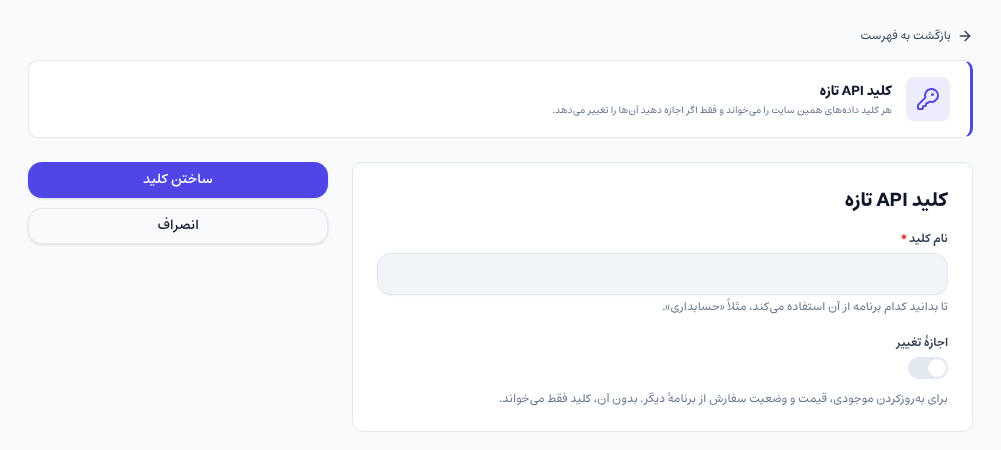
After Create key, the key is shown this one time only. Copy it right away and put it in the app that will use it. Sima stores the key in a way that even Sima cannot show it again; if you lose it, create a new key and revoke the old one.
2. The key list and revoking a key
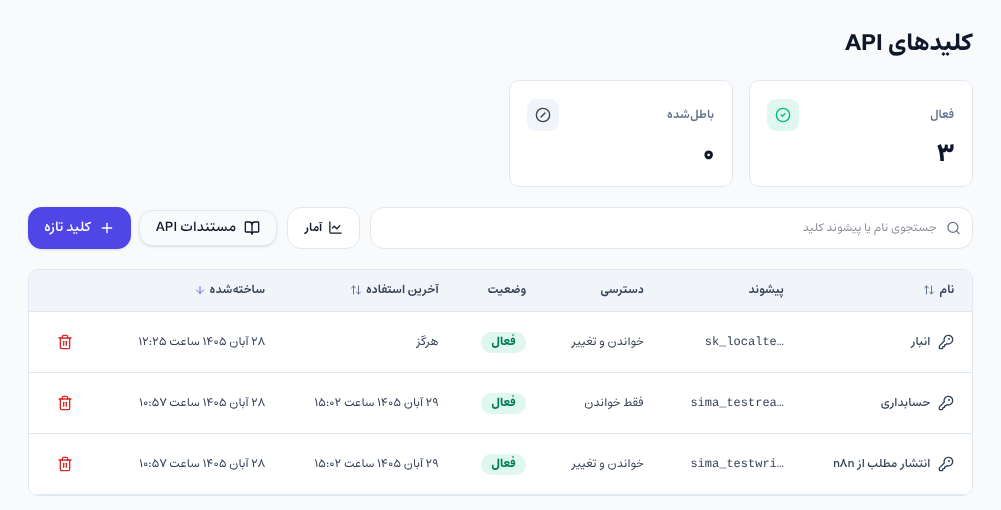
The same page lists every key with its prefix, access (read only, or read and change), status and last use. Last used helps you spot keys nobody uses any more. The bin icon revokes a key, and from that moment every request with it is refused.
3. Connecting an app
Your developer sends the key in the Authorization header, and the base address is https://your-domain/api/v1:
curl -H "Authorization: Bearer sima_..." https://your-site.example/api/v1/ordersThe full API reference, with every address and field, is on your own site at /docs/api, and it lists only what your site actually has. A few things the developer should know:
- A key works only on the site it was created on.
- Lists are paged (
page, andper_pageup to 100), andupdated_sincereturns only rows changed after that moment; it is the best way to sync on a schedule. - Amounts in the API are in rials (integers), not tomans. Divide by 10 to show tomans.
- Each key may make 120 requests a minute. Beyond that it gets a 429, and the
Retry-Afterheader says how long to wait. - Errors are JSON with a stable
code, such asforbiddenfor a key without Allow changes.
4. What is available
- Every site: orders (with lines, totals, status and buyer) and customers.
- Shop: products and categories; with Allow changes, each variant's price and stock, and an order's status.
- Content: posts, pages, categories and tags; with Allow changes, creating and editing posts and pages, uploading pictures, and writing translations into the site's other languages. A post published with a key goes through the panel's own editor rules and has no author.
- Other sections such as bookings, courses, books, a restaurant menu and property listings, if your site has them.
5. Webhooks: being told instead of asking
If your app should hear about an event the moment it happens (say, an order being paid) instead of asking the API every few minutes, set up a webhook:
- Under Settings → General settings → Messaging, in the Webhook section, enter the webhook address (an
httpsaddress on the internet) and a Signing secret of at least 16 characters, and save. The test button sends one test event. - Under Settings → Message templates, tick Webhook on each event's template you want (for example an order being paid).
Each event is a POST with a JSON body and an X-Sima-Signature header: the HMAC-SHA256 of timestamp.body with your signing secret. Your app should check the signature to be sure the request came from Sima. If it does not answer with a 2xx, Sima sends it again.
Security tips
- Create one key per app, so if one leaks you revoke only that one.
- Do not give change access to an app that only reads reports.
- Never put a key in browser code, a mobile app or a public code repository; keep it only on the receiving app's server.
Common questions
Do I need to be a developer to use the API?
Not to create a key. Connecting apps is a developer's job, or a job for tools like n8n that send HTTP requests. Many accounting and inventory programs can do it too.
I lost my key. Can I see it again?
No, a key is shown only once. Create a new key, put it in the app and revoke the old one.
What happens to my keys if my plan no longer includes the API?
The keys and webhook you set up are not deleted, but they stop working until you are on a plan with the API again.
Comments
Sign in to leave a comment.
Sign inLoading…