Verify customers' identity with Shahkar or an ID document
For most shops a confirmed mobile number is enough. But if you sell expensive goods or on instalments, or the rules of your trade say you must know the buyer, customer identity verification helps. Sima has two ways: matching the national code to the mobile number through Shahkar, Iran's mobile ownership service, or an ID document that you review and approve. It is a plan feature; if you do not see it in the panel, your site's plan does not include it.
1. Turning verification on
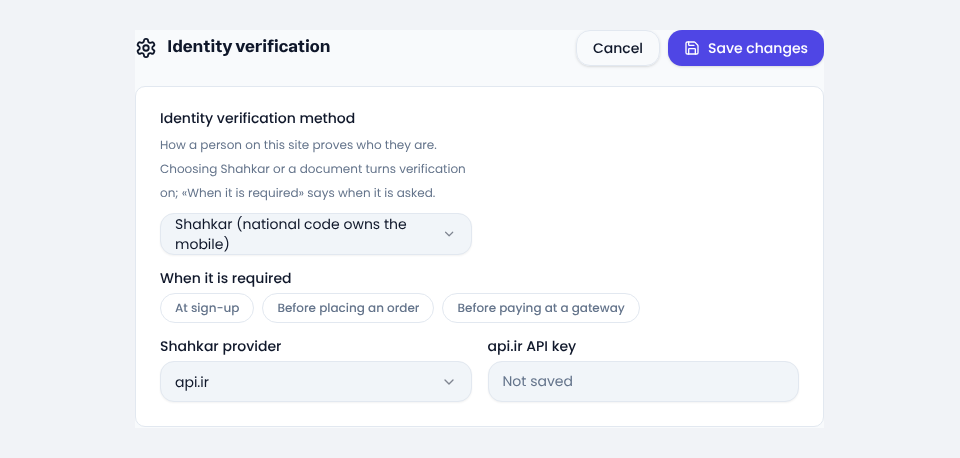
Under Settings → General settings → Identity verification, pick one in Identity verification method:
- Shahkar (national code owns the mobile): for Iranian customers. Automatic, in a few seconds.
- Identity document reviewed by staff: the customer sends a photo or PDF of a passport, national ID card or residence permit, and you approve or refuse it. For customers abroad, or when you have no Shahkar service.
Choosing a method turns verification on; None turns it off.
2. The Shahkar provider
Shahkar inquiries go through a provider. Under Shahkar provider pick one (api.ir or Jibit) and enter the API key from that service's panel. Once saved, the key is never shown again. Until a provider and its key are set, the site asks nobody for verification and no purchase is held up.
3. When it is asked
Under When it is required, pick one or more:
- At sign-up: someone who has just signed up sees nothing in their account but the profile until they are verified.
- Before placing an order: a shop, restaurant or booking order is not placed until they are verified, and the customer is sent to verify.
- Before paying at a gateway: paying for an order or topping up the wallet does not start until they are verified.
An order or payment already started is not stopped by this setting.
4. What the customer sees
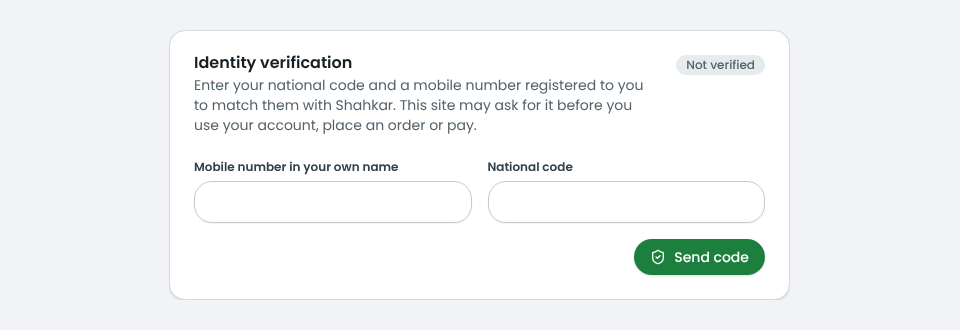
On the account's profile page there is an Identity verification card. With Shahkar, the customer enters a mobile number registered in their own name and their national code, types the code sent by SMS, and if Shahkar confirms, they are done. With a document, they send the issuing country, the kind and number of the document and an image of it (up to 8 MB), and wait for your approval.
If the customer later changes their national code or mobile number, the earlier verification no longer counts and they verify again.
5. The inquiry log and document review
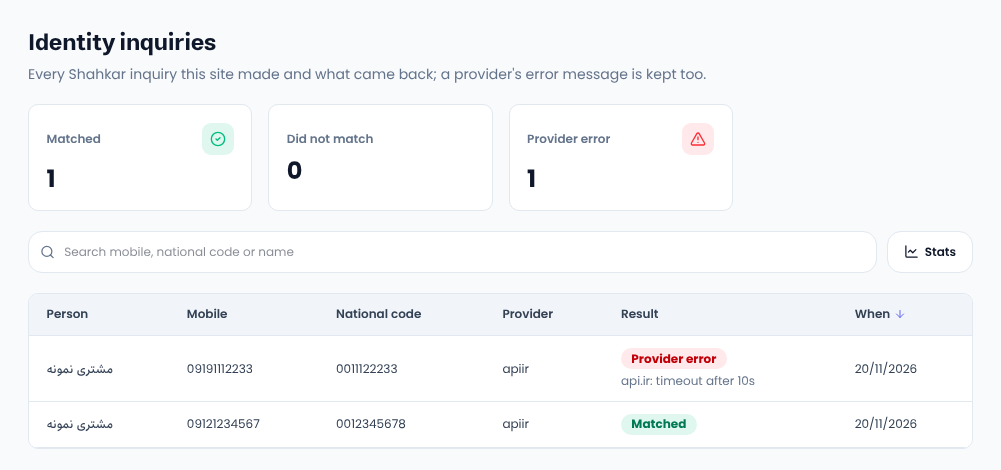
Every Shahkar inquiry is listed on People → Users, under the Identity inquiries button: who, with which mobile and national code, and whether it matched, did not match or the provider failed. If the provider fails, its message is there, and the customer is told the service is unavailable for now, never that the number is not theirs.
With documents, administrators are told each time one arrives. Open it on that user's page and press approve or refuse; a refusal needs a reason. The result reaches the customer by SMS, email and a panel notice.
Common questions
Who pays for Shahkar inquiries?
The provider you chose charges your own account with them. Sima charges nothing for it.
Can companies be verified with Shahkar?
No. Shahkar confirms that a person owns a mobile number. For a company, use the document method.
Do I have to verify my own identity to build a site on Sima?
Yes. Sima verifies the account owner before their first site, so nobody can build fake sites on simacms.ir addresses. You do it from the same identity verification card in your account on simacms.ir.
Comments
Sign in to leave a comment.
Sign inLoading…