The panel's AI assistant: running your site in a sentence
A site panel is full of menus and forms. The AI assistant is a shorter way: you write what you want in your own words, such as "show me the last five orders" or "make a 20% discount code for Yalda", and the assistant does what you would have done through the menus. Every change is shown to you first, and nothing happens until you press Approve and do it.
The assistant is a plan feature. If you do not see AI Assistant in your panel, your plan does not include it.
1. Opening the assistant
The assistant is at hand on every panel screen: the sparkle icon at the top opens it beside the page you are on, so you do not have to leave what you are doing. For a full page with your list of conversations, go to AI Assistant → Assistant.
2. Asking questions and getting reports
Anything that only reads runs without asking: orders and their status, products and stock, revenue for a period, comments waiting for review, SEO status, tickets and the other sections your site has. For example:
- "How many orders did we have this month, and what did they add up to?"
- "Which products have fewer than 5 in stock?"
- "Which pages of the site are weakest for SEO?"
3. Changes, only with your approval
When something needs changing, the assistant does not do it; it shows a card with the action's name and every value it will send. If it is right, press Approve and do it; if not, press Don't do it. If an action touches several rows, you see every row with its current and new value.
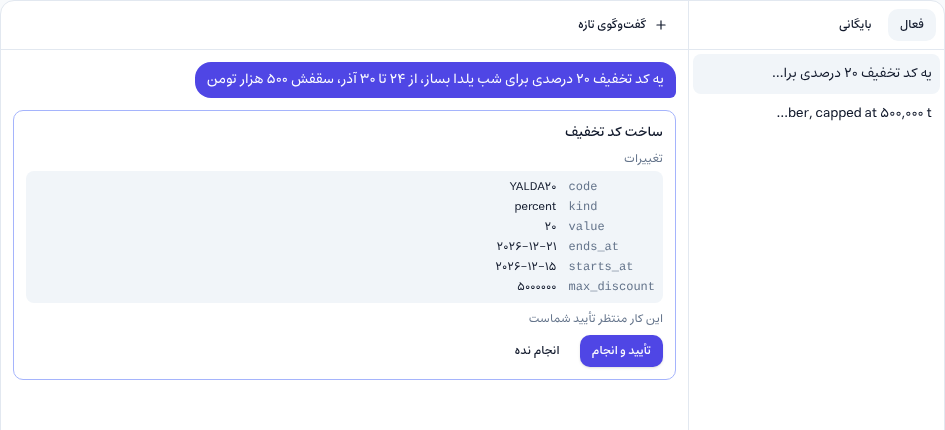
After you approve, the assistant reports the result, and the Open link takes you to that record's own screen in the panel.
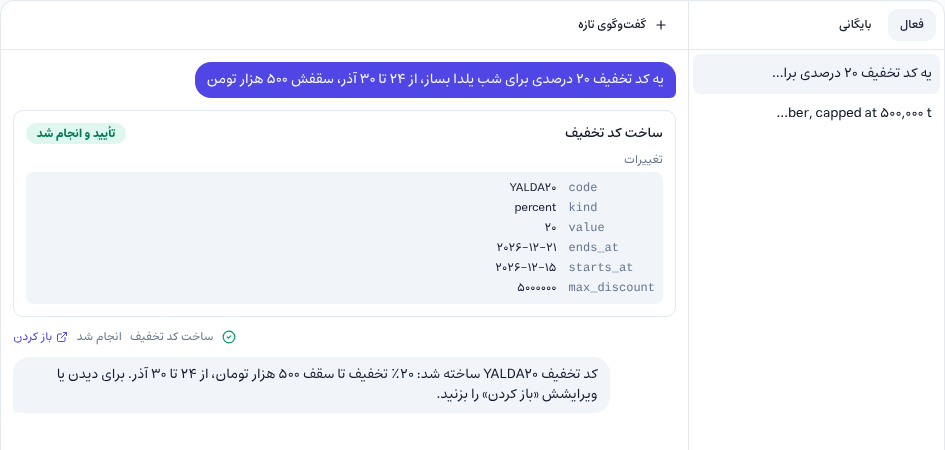
Anything the assistant creates, such as a new post or product, starts as a draft. The assistant links to it so you can review it, and publishing it takes a separate approval.
4. What the assistant cannot do
The assistant only does what you yourself are allowed to do in the panel, and each change it makes is recorded in the activity log as the assistant acting on your behalf. Some things are kept out of its reach on purpose:
- keys, passwords and secret settings
- changing users, groups and permissions, and people's wallets
- refunds and settlements
- backups, restores and deleting the site
The assistant can read customers, but their mobile number and email reach the AI model half-masked, and their address and national code are not sent at all. You still see them in full in the panel.
5. Conversations
Each conversation is yours, and other admins do not see it. You can close the panel; the assistant keeps working, and when you come back everything is there. Archive a conversation you want to keep; conversations that are not archived are deleted 90 days after their last message.
6. The assistant in the editors
Apart from the conversation, the forms that hold text (posts and pages, products, categories, courses, booking services and more) have a few small helpers beside them:
- Writing assistant: the sparkle button in the text toolbar. It works on the selected text, or the whole text: write, rewrite, shorter, longer, summary, bullet points, and a formal, casual or sales tone.
- Translate with AI: translates the main language's text into another of the site's languages and puts it in the form.
- SEO suggestions: suggests an SEO title and description from the title and text.
- Page building: in the page builder, describe the page you want and it is built on the canvas.
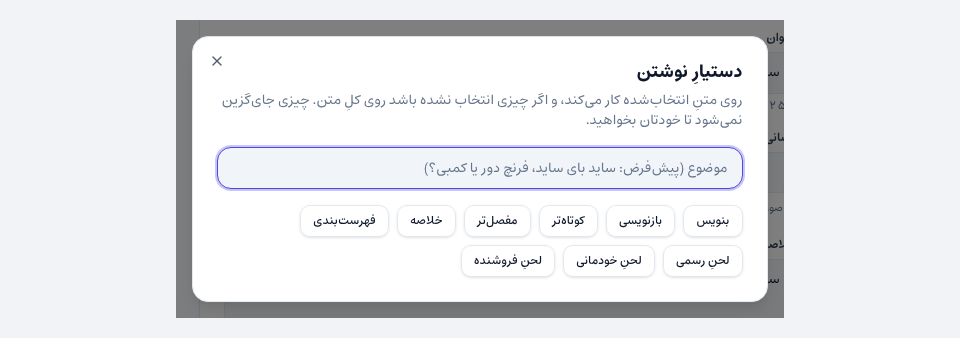
None of them saves anything; the result goes into the form, you read it and save it yourself. If you do not like it, Ctrl+Z takes it back.
7. Cost
Every plan comes with an AI allowance for each period, which is spent first. When it runs out, spending moves to the site's platform credit, which you buy from your account panel on that site's page and which never resets. If both run out, the assistant says there is not enough credit before sending anything; no debt is created. AI Assistant → AI usage shows how much this period has spent and on what.
Common questions
What if the assistant misunderstands?
Nothing changes without your approval. Read the card, and if a value is wrong press Don't do it and ask more precisely.
Can my staff use the assistant too?
Yes, if they have access to it. Each person only gets from the assistant what they are allowed to do in the panel themselves.
Can the assistant see other sites' data?
No. The assistant only sees this site's data.
Comments
Sign in to leave a comment.
Sign inLoading…